OctaApp - Donate Plasma
- 4.2
- Rating
- 100.00K
- Installs
- Free
- Price

 Analysis by App-foxy
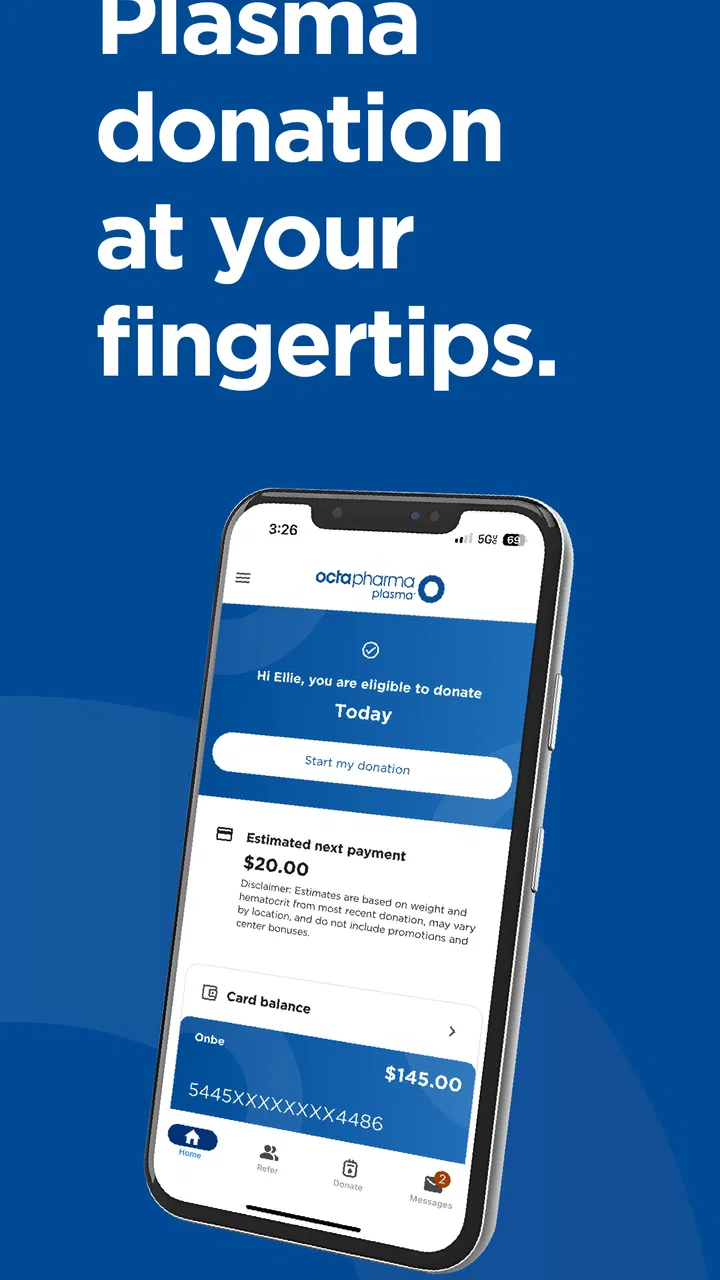
I found OctaApp - Donate Plasma most useful when I treated it as a personal organizer for plasma donation rather than as a general medical app. It comes from Octapharma Plasma Inc. and is aimed at people who already use, or are considering, Octapharma Plasma donation services. The app is free, available to everyone by age rating, and its main value is keeping donation-related information easier to reach on a phone.
That sounds simple, but simplicity matters in a medical setting. When I am preparing for an appointment, I do not want to search through messages, paper reminders, or several unrelated apps. I want one place connected to my own donation activity. In my experience, that is where this app makes the strongest case: it can reduce small bits of administrative friction around a recurring task.
It is also important to understand the boundary. This is not a replacement for medical advice, a diagnostic tool, or a complete personal health record. Its usefulness depends on being a companion to the donation process. If you want broad symptom tracking, medication management, or detailed health analysis, a different medical app will be a better fit.
You May Also Like

 Blood Strike: 2.5 Anniversary
Blood Strike’s Loadouts Turn Every Drop Into a Tactical Gamble
A close look at Blood Strike’s custom loadouts: how fast access to signature weapons reshapes its battle royale rhythm, rewards preparation, and narrows the gap between fights.

 Pandora - Music & Podcasts
Pandora’s Music Is Easy to Start, but Harder to Recover
Pandora’s strength is its low-effort path from a seed to a station. Its weak spot is how much confidence it asks you to place in connection, setup, and quiet recovery.

 8 Ball Pool
 Is Built on Rivalries, Rematches, and Routine
A close look at the rivalries, rematches, shared routines, and unanswered safety questions that turn a quick pool match into a persistent mobile community.

 Samsung Music
’s Quiet Strength Is Playing What You Already Own
Its reach comes less from spectacle than from dependable access to a personal library. That simplicity is both the app’s strongest retention engine and its ceiling.

 AccuWeather: Weather Radar
AccuWeather Review: A Quick, Clear Forecast for Everyday Decisions
For everyday plans, the best forecast is the one you can understand quickly. AccuWeather makes rain timing, radar, and local conditions easy to act on, with a few trade-offs.

 Hill Climb Racing
Why Hill Climb Racing Still Turns Crashes Into One More Run
A tiny car, a bumpy hill and one more upgrade: Hill Climb Racing keeps resurfacing because its simple chaos makes every near-miss feel personal.
More From Our News Desk
View All News


How it works in a shared household
A realistic example is a household where two adults donate plasma, or where one person donates while another helps with transportation and scheduling. On a shared tablet or family phone, it may be tempting to leave one account signed in for convenience. I would avoid that. Donation information is personal, so each donor should use their own account and treat the app as an individual record rather than a household dashboard.
That distinction becomes especially useful when people coordinate rides. One person can use their own account to check the information relevant to their donation, while a partner or relative handles the practical reminder separately through a calendar or conversation. I would not assume that another household member can safely manage the account just because they share the device. Shared access can blur whose information is being viewed and who is responsible for an appointment.
The app is therefore best for personal donation organization, not for combining several donors into one profile. If a family has multiple users, I would keep separate phone profiles or sign out between users whenever the device is shared. That adds a little effort, but it is a sensible trade-off for keeping medical and donation details separated.
This is one of the less obvious points about a focused app like this: its narrow purpose can make it easier to use correctly, but only if the household respects account boundaries. A general family calendar may be better for the ride, childcare, or work arrangements surrounding a visit. OctaApp is better kept for the donor’s own information.
Setting up the app without mixing responsibilities
My advice is to install it on the device used most often by the donor, then complete the account setup carefully rather than rushing through it while distracted. Use the donor’s own details, keep the sign-in information private, and check that the displayed information belongs to the correct person before relying on it for planning.
That last check matters in homes where phones are passed around. A saved session can make an app feel convenient, but it can also make it unclear whether the screen is showing one person’s donation information or another’s. I would not copy screenshots into a family group chat unless the donor is comfortable with that. A simple message such as “I have my donation arranged” shares the practical information without spreading personal details.
OctaApp is free, which removes the usual subscription decision that can make a small utility feel burdensome. Still, free does not mean it should be treated casually. The app is connected to a medical and donation context, so I would keep the phone protected with the device’s normal lock and avoid leaving the account open on a public or shared device.
The current version is 5.0.6, and the app requires Android 7.0 or later. That makes it accessible on many older Android phones, although the experience will naturally depend on the individual device. Before planning around it, I would make sure the phone can install and run the app comfortably, especially if it is an older household handset used for several other tasks.
One practical setup habit helped me: I separate “information I need from the app” from “reminders I need elsewhere.” If the app shows donation-related details, I use those details as the source for my own planning. Then I place the actual travel reminder in the phone calendar, because a calendar is designed for alarms, shared schedules, and daily coordination. This avoids expecting OctaApp to do the job of a full household planner.
Coordinating a donation around everyday life
The best everyday use case is a recurring donor whose schedule changes from week to week. Work shifts, school runs, appointments, and transportation can all make a donation visit harder to organize. Instead of relying on memory, I would check the app before making arrangements, then confirm the practical details with the person providing transportation.
For example, imagine that I plan to donate after work. I can review my donation information first, choose a realistic time for the visit, and then tell a partner when I expect to leave. If the partner is also a donor, they should check their own account rather than assuming both people have identical information. That small separation prevents a common household mistake: planning around one person’s details while silently applying them to someone else.
I also like the idea of using the app before leaving home, not while standing outside the center or sitting in a car. A quick review in advance gives me time to notice a problem with my plan and contact the appropriate center or support channel if needed. The app can help me organize information, but it should not encourage last-minute guessing about eligibility, health, or appointment requirements.
Another useful trade-off is that a dedicated app can be less cluttered than a general notes app, but it may not cover every coordination need. I would use a calendar for alarms, a map application for travel, and direct communication for changes involving another person. OctaApp fits in the middle: it supports the donation-related part of the plan, while the rest of the household logistics still belong in ordinary tools.
For someone who donates only once and does not expect to return, the benefit may be modest. A person with a recurring routine is more likely to appreciate having donation information available in a focused place. That is where the app feels more purposeful than simply saving a web page or writing a note.
Trust, age, and who should use it
The app carries an Everyone content rating, but that should not be confused with saying that every child is an appropriate independent user. The service concerns plasma donation, personal information, and real-world medical decisions. In my view, an adult donor should control the account and decide what, if anything, is shared with a parent, partner, or caregiver.
A teenager or younger household member might use the same phone for unrelated apps, but I would not hand over an unlocked donation account without supervision. The right approach is not to invent a family profile or assume that a shared device creates shared permission. Instead, keep the donor’s account private and discuss only the practical information needed for transport or scheduling.
Trust also matters when someone helps an older relative or another adult with technology. Assistance with installation or navigation can be useful, but the donor should remain the person who confirms the information and decides who can see it. If a caregiver needs to help regularly, I would establish a clear routine: the donor opens the app, checks the relevant screen, and then communicates the necessary detail. That is safer than leaving the account permanently available to everyone.
Because this is a Medical app, I would also be careful about treating anything on the screen as a medical clearance. The app can support access to donation information, but personal health questions still deserve attention from qualified staff. If I felt unwell, had a concern about donating, or was unsure whether a situation affected eligibility, I would seek guidance from the donation center or a healthcare professional instead of trying to resolve the issue through the app alone.
This is where the app’s focused design can be both reassuring and limiting. It is easier to understand than a large health platform filled with unrelated records, but it is not intended to replace those broader resources. People who want a complete health timeline, family medical sharing, or medication reminders should look elsewhere and use OctaApp only for the donation-specific part of their routine.
What the public response suggests
The app has a 4.3 average from around 942 ratings, with over 400 written reviews, and it has passed the 100K-plus install mark. I read those figures as signs that it has found a real audience, while still remembering that popularity does not guarantee a perfect experience on every phone or for every donor.
Its developer, Octapharma Plasma Inc., is directly connected to the service the app supports. That gives the app a clear purpose: it is not trying to be a universal health platform. I generally prefer that kind of focus when an app handles a specific recurring activity, because the user can understand why it exists and what job it is supposed to perform.
At the same time, a focused app can feel unnecessary if the user rarely donates or already has a reliable routine with the center. Someone who prefers speaking with staff, keeping paper records, or using a simple calendar may not gain enough from adding another app. I would recommend installing it when the convenience of having donation information on hand outweighs the small responsibility of maintaining a separate account.
There is also a difference between information access and action. The app may make it easier to review donation-related details, but it does not remove the need to arrive prepared, follow center instructions, or communicate when plans change. I would judge it by whether it saves me time and prevents confusion, not by expecting it to manage the entire donation experience.
Where it fits beside ordinary alternatives
The most obvious alternative is a phone calendar. A calendar is better for recurring alerts, shared household schedules, and reminders that involve several people. It is also familiar to nearly everyone. However, a calendar entry is only a note created by the user; it does not serve the same purpose as an app dedicated to donation information.
A notes app is even simpler, but it depends on manual copying and updating. That can create an avoidable risk: an old note may look authoritative even after circumstances change. I would rather use notes for questions I want to ask at my next visit than use them as the sole place for current donation information.
A broad health app may offer more categories, such as medications, symptoms, exercise, or appointments. That wider scope is useful for someone building a complete personal health record, but it can also bury a specific donation task among unrelated features. OctaApp is the better match for a donor who wants a dedicated place for this one activity, while a comprehensive health platform is better for someone managing many kinds of health information.
Paper records still have one advantage: they work without a battery, account session, or compatible phone. I would not dismiss them completely, especially for backup notes or questions. My preferred approach is not to choose one tool for everything. I use the dedicated app for donation-related access, a calendar for timing, and direct communication for household coordination. That division of labor is more dependable than forcing any single tool to handle every part of the routine.
Who will benefit most, and who should skip it
I would recommend OctaApp to a recurring plasma donor who wants a convenient, focused way to reach donation information from an Android phone. It is particularly sensible for someone whose schedule changes often, someone who coordinates rides, or someone who dislikes searching through email and paper reminders before a visit.
It can also help a household support a donor without taking over the donor’s account. The donor remains the account holder, while relatives help with calendars, transport, or reminders. That arrangement preserves privacy and still makes the practical side of donation easier.
I would be more cautious about recommending it to someone who wants a general medical record, a family health dashboard, or detailed wellness tracking. Those are different needs. I would also skip it if I were not an Octapharma Plasma donor and had no reason to organize this particular kind of donation activity. In that situation, installing a service-specific app would add clutter without solving a real problem.
People using older devices should check compatibility before building their routine around it, since Android 7.0 is the minimum operating system. The app is free, so cost is not the obstacle, but device age, account habits, and willingness to keep personal information private still affect whether it will feel worthwhile.
My household verdict
After using it as a donation companion, I see OctaApp - Donate Plasma as a practical, narrowly focused app rather than a complete medical solution. Its strongest quality is that it gives recurring donors a dedicated place to handle donation-related information, which can be more dependable than scattered notes or messages.
The most important tip is to keep the account personal even when the phone is shared. Let the app handle the donor’s information, let the calendar handle reminders, and let household conversations handle rides and timing. That separation makes the whole process clearer and avoids treating a shared device as permission to share private details.
My final recommendation is positive for the right audience: adult plasma donors who value convenient access and want less administrative friction. I would not present it as essential for every household, and I would never use it as a substitute for professional medical guidance. But when its purpose matches your routine, the free app from Octapharma Plasma Inc. can earn a useful place on your phone without trying to do more than it should.
FAQs for OctaApp - Donate Plasma
01What is OctaApp and how does it work?
OctaApp is a mobile application designed to streamline the process of donating plasma. It provides users with the ability to locate donation centers, schedule appointments, and track their donation history. The app also offers educational resources about the plasma donation process and its benefits. By using the app, donors can manage their appointments more efficiently and receive notifications about upcoming donations.
02Is OctaApp available for both Android and iOS devices?
Yes, OctaApp is available for download on both Android and iOS platforms. Users can find it on the Google Play Store and the Apple App Store. The app is designed to be user-friendly and accessible on both operating systems, ensuring that a wider audience can benefit from its features and services.
03Are there any costs associated with using OctaApp?
No, OctaApp is completely free to download and use. There are no hidden fees or subscription charges. Users can access all of its features, including appointment scheduling, donation tracking, and educational resources, without any cost. However, users should have a stable internet connection to access the app's online features effectively.
04How secure is my personal information on OctaApp?
OctaApp prioritizes the security and privacy of its users' personal information. The app implements robust encryption protocols to protect data from unauthorized access. Users can rest assured that their personal details, such as contact information and medical history, are securely stored and handled in compliance with data protection regulations.
05What are the benefits of donating plasma through OctaApp?
Donating plasma through OctaApp offers several benefits. Users can enjoy a streamlined donation process with easy appointment scheduling and reminders, reducing wait times at donation centers. The app also provides educational content, helping donors understand the importance of plasma donation and its life-saving impact. Additionally, users can track their donation history and receive notifications about eligible donation dates.
Pros
- Easy-to-use interface for new users.
- Comprehensive donor eligibility guidelines.
- Efficient appointment scheduling system.
- Real-time updates on donation status.
- Reward system for regular donors.
Cons
- Limited to specific donation centers.
- Requires stable internet connection.
- No offline feature for appointment tracking.
- Occasional app crashes reported.
- Limited language support options.

OctaApp - Donate Plasma
Gallery